在react框架中,组件是构成一切应用的基石,整个页面的渲染与操作,均是在组件层面来完成。按照其官网的说法, 每一个组件可以当做为一个virtual DOM节点,所有的数据传递及状态改变均是在此层面完成,然后通过render方法 渲染至真实的DOM。而基于virtual DOM的diff算法,也被认为是该框架具备高效操作DOM的原因。(关于react框架与 原生js操作DOM效率问题,网上有较多的比较,个人暂时没有进行过深入的研究;不过在实际应用层面来说,还是得 结合现实的业务情景。毕竟再好的锤子,都不适合用来砍树)作为在应用react框架过程中,很容易因为组件的操作 不当导致整个的页面异常,甚至根本不显示,因此了解组件相关的生命周期就显得比较重要。
针对组件的渲染过程,通过代码可以比较直观的观察: 在mian.js中,编辑如下代码:
import React from 'react';
import ReactDOM from 'react-dom';

class HelloWorld extends React.Component {
    constructor(props) {
        super(props);
        this.state = {
            default_value: 'default'
        };
        console.log('constructor:default_value is default');
    }

    componentWillMount() {
        this.setState({
            default_value: 'WillMount_value'
        });
        console.log('componentWillMount:default_value is WillMount_value');
    }

    componentDidMount() {
        this.setState({
            default_value: 'DidMount_value'
        });
        console.log('componentDidMount:default_value is DidMount_value');
    }

    componentWillReceiveProps(nextProps) {
        console.log('componentWillReceiveProps:')
    }

    shouldComponentUpdate(nextProps, nextState) {
        console.log('shouldComponentUpdate:');
        return true
    }

    componentWillUpdate(nextProps, nextState) {
        console.log('componentWillUpdate:')
    }

    componentDidUpdate(prevProps, prevState) {
        console.log('componentDidUpdate:')
    }

    componentWillUnmount() {
        console.log('componentWillUnmount:')
    }


    render() {
        console.log('render begin');
        return (<div>
            <h1>Test component life time</h1>
            <p>{this.state.default_value}</p>
        </div>)
    }

}

ReactDOM.render(<HelloWorld/>, document.getElementById('content'));
通过运行程序,观察到控制台输出内容如下:
constructor:default_value is default
componentWillMount:default_value is WillMount_value
render begin
componentDidMount:default_value is DidMount_value
shouldComponentUpdate:
componentWillUpdate:
render begin
componentDidUpdate:
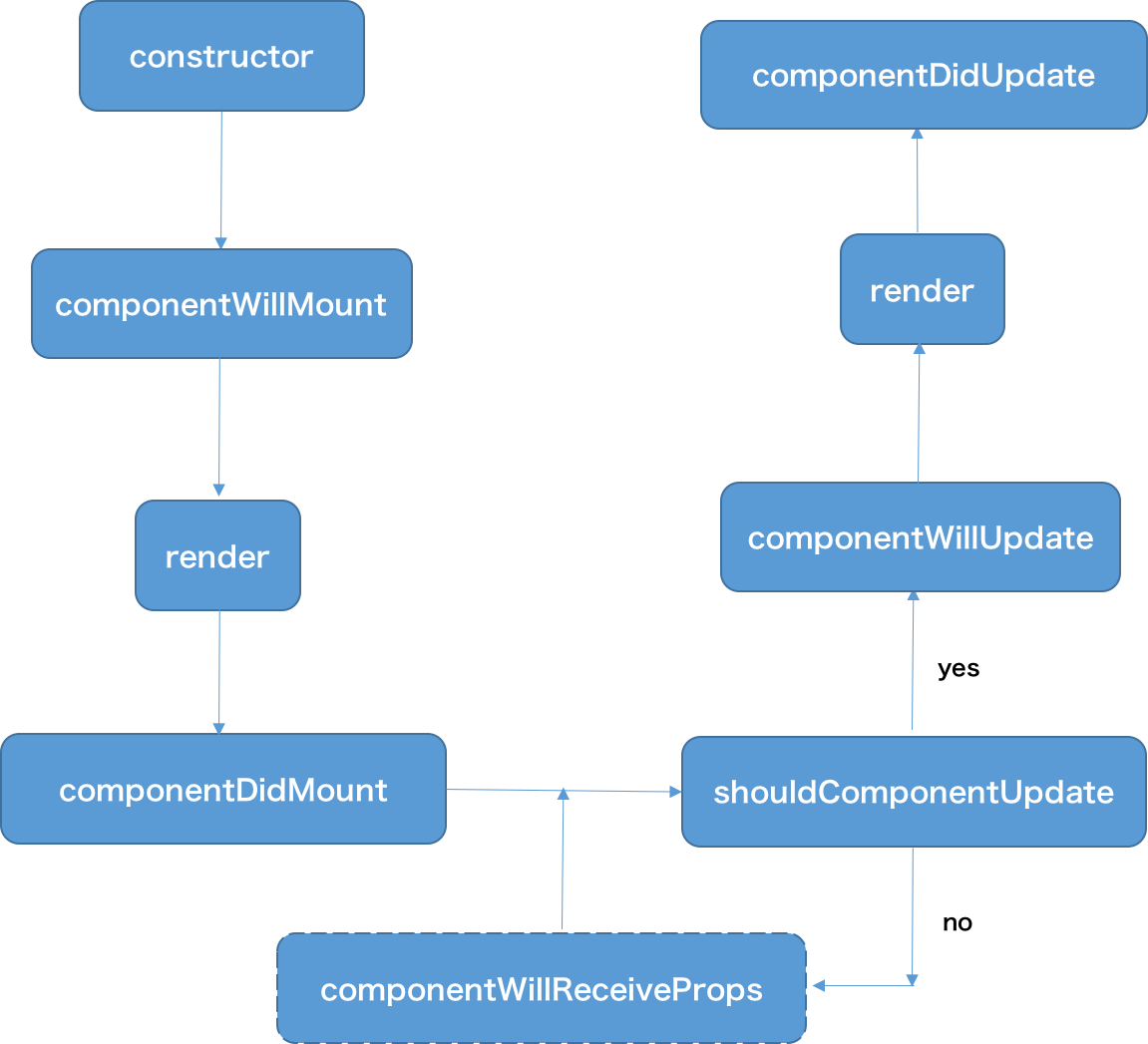
以上反应出整个react组件的渲染过程: 首先进入construct,初始化相关参数,接着进入到componentWillMount,对即将渲染的组件进行进一步 的设置或是状态的更改,此处可以改变一些默认行为(例如进一步设置state,不会引起重新渲染), 在此部分之后,通过render方法组件完成挂载,即渲染到真实DOM结构。若组件定义了componentDidMount 方法,则会在渲染完成后立即调用,一般会在此处进行setState设置。在react框架中,一旦state状态 发生改变,将会触发组件重新渲染,此时会先调用shouldComponentUpdate函数,若此函数返回false,则后续的 componentWillUpdate,render,componentDidUpdate均不会调用,即组件不会重新渲染;若返回true,则紧接着执行 componentWillUpdate,即在组件状态改变前,做一些其他工作,例如发出消息通知等,该函数不能更改state。 然后会进行render渲染,在渲染结束后,调用componentDidUpdate,可以在此函数内操作更新后的DOM。
通过上述代码,会发现componentWillReceiveProps和componentWillUnmount方法没有被调用,因为这两个 方法是在组件接受父组件传递过来的参数时以及从组件自身被移除时才会触发。将以上main.js进行修改:
// HelloWorld组件的render方法修改如下:
render() {
        console.log('render begin');
        return (<div>
            <h1>Test component life time</h1>
            <p>{this.state.default_value}</p>
            <p>{this.props.props_value}</p>
        </div>)
    }

// 同时增加一个新的MainHelloWorld组件:
class MainHelloWorld extends React.Component {
    constructor(props) {
        super(props);
        this.state = {
            props_value: 'MainHelloWorld',
            unMount_value: false
        };
    }

    changeValue() {
        this.setState({
            props_value: 'ChangedHelloWorld'
        });
    }

    unMount() {
        this.setState({
            unMount_value: !this.state.unMount_value
        });
    }

    render() {
        return (
            <div>
            <p onClick={this.changeValue.bind(this)} >changeValue click me!</p>
            <p onClick={this.unMount.bind(this)} >unMount click me!</p>
            {!this.state.unMount_value && <HelloWorld props_value={this.state.props_value}/>}
            </div>
        )
    }
}

// 修改ReactDOM.render方法:
ReactDOM.render(<MainHelloWorld />, document.getElementById('content'));
此时运行程序,首次刷新页面时,在控制台出现的信息和之前一致。 接下来点击页面”changeValue click me!“时,控制台出现以下信息:
componentWillReceiveProps:
shouldComponentUpdate:
componentWillUpdate:
render begin
componentDidUpdate:
由此可看出在组件接收参数更新时,基本与componentDidMount之后一致。 若点击页面”unMount click me!“,页面上关于HelloWorld组件的部分消失,控制台出现以下信息:
componentWillUnmount:
若再次点击页面”unMount click me!“,则会出现与首次加载页面一样的信息。 通过以上实际检测,绘出react组件的执行周期图如下: