install
安装
通过npm 安装
npm install https://github.com/Ysanwen/easyApi.git#master -g
安装成功后,通过命令行参数-V查看版本:
easyApi -v
# 0.0.1
出现版本号,表示已安装成功。
基础使用
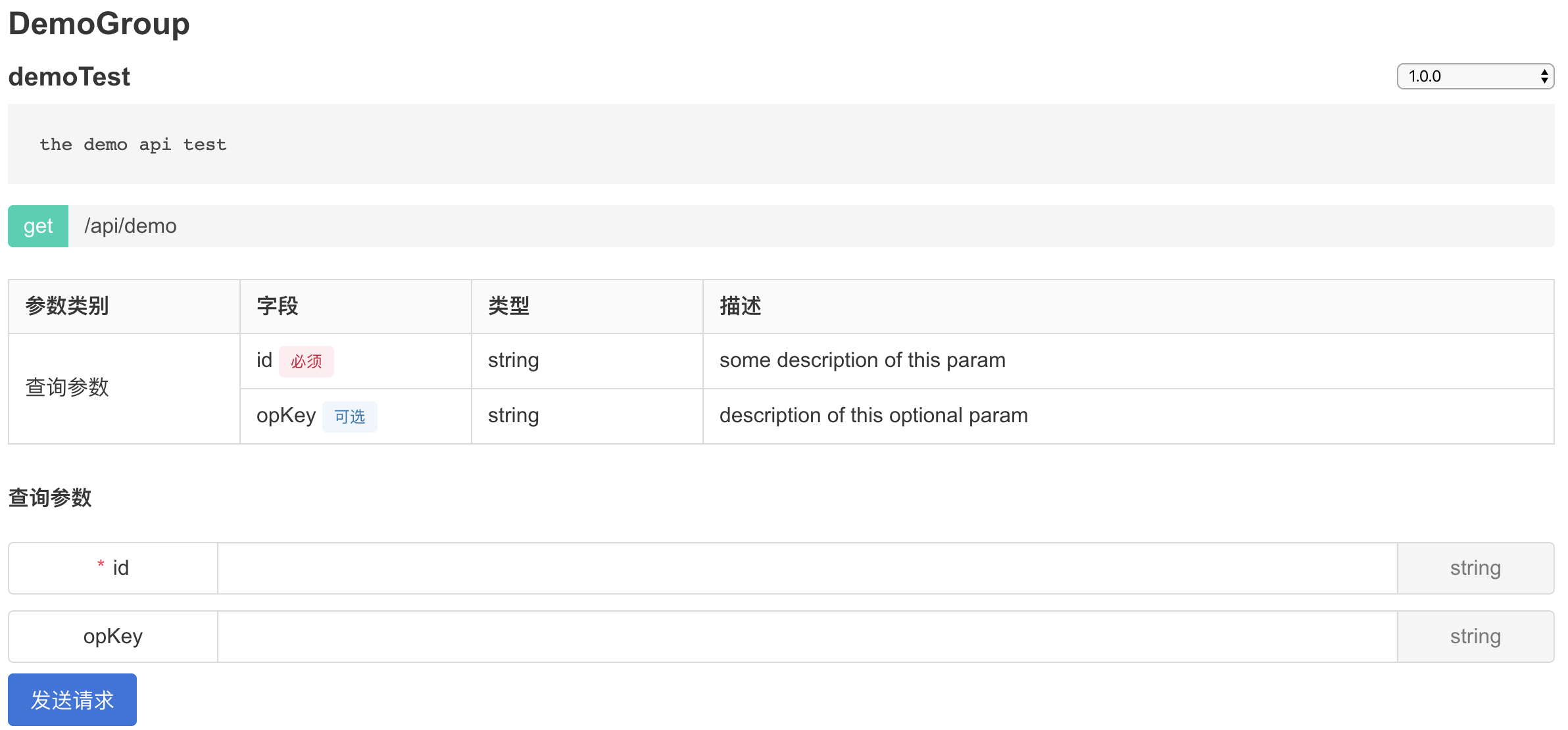
创建一个demo文件夹,里面新建一个demo.js文件,输入以下内容并保存
/**
 * @ApiStart
 * @Api get /api/demo
 *
 * @Version 1.0.0
 * @Group DemoGroup
 * @Name demoTest
 * @Description the demo api test
 *
 * @QueryParam {String} id some description of this param
 * @QueryParam {String} [opKey] description of this optional param
 * @ApiEnd
 */
在命令行模式下,进入demo文件夹的父级目录,执行
easyApi -i demo

# 当屏幕出现you can use "easyApi -s -o [public path]" to start a static server时
执行easyApi -s # 将会在本地开启一个httpserver,默认端口为9527
打开浏览器,访问http://localhost:9527!